DR Leeway Option Everything you need to know about the DR Leeway Option
Welcome to the hub for information and resources regarding the DR Leeway Option.
Best practices for performance
It is important to select a number of hours that aligns with your ability to participate in peak demand events during the week (Monday to Friday). Since the credit calculation is based on the average power reductions achieved during events, missing an event results in a zero reduction, which lowers this average and consequently, the credit.
Choose based on your participation history
Review your participation history in your Customer Space to assess how your last season went.
Select an appropriate number of hours based on your experience
If this is your first season, opting for a lower number of peak demand event hours, such as 20 or 40 hours, may be a good way to gain an understanding of your habits and then make adjustments.
In your Customer Space, you will find the recommended maximum number of hours of peak demand events for the winter period that applies to your situation.
Include weekends if relevant
With the DR Leeway Option, including weekends does not carry a risk of a penalty. If your company can reduce demand by 0,1 kW during events held on Saturdays and Sundays, it is advisable to include them.
Resources to help you
Looking for help signing up or updating your contacts? We’re here to help!
Enrollment
Want to participate in peak demand events but unsure where to start? Here’s how to get started:
Modify an enrollment
You can change your terms of participation in peak demand events before the season begins, up until November 29.
Manage contacts
Update the list of individuals designated to receive notifications for peak demand events, or add new contacts.
Forecasting peak demand events
Want to know when the events will take place? Check our peak demand event forecasting tool regularly to identify periods when a power reduction may be requested, depending on the option or rate applicable to your contract.
Incentives
Frequently asked questions
Have questions? Here are answers to common questions.
Peak demand event notifications are sent to individuals designated for this purpose in your account. Check regularly that their contact information is up to date in your Customer Space so they are notified at the right time.
Access your Customer Space the day after a peak demand event to review your results.
Yes, it is quite possible that there will be peak demand events during all the hours scheduled.
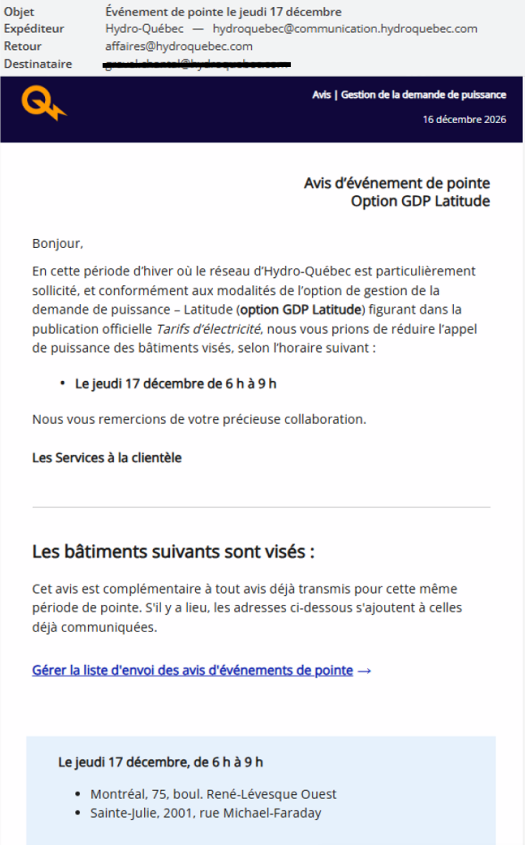
Here's an example of a peak demand event notification for an account with two service addresses.